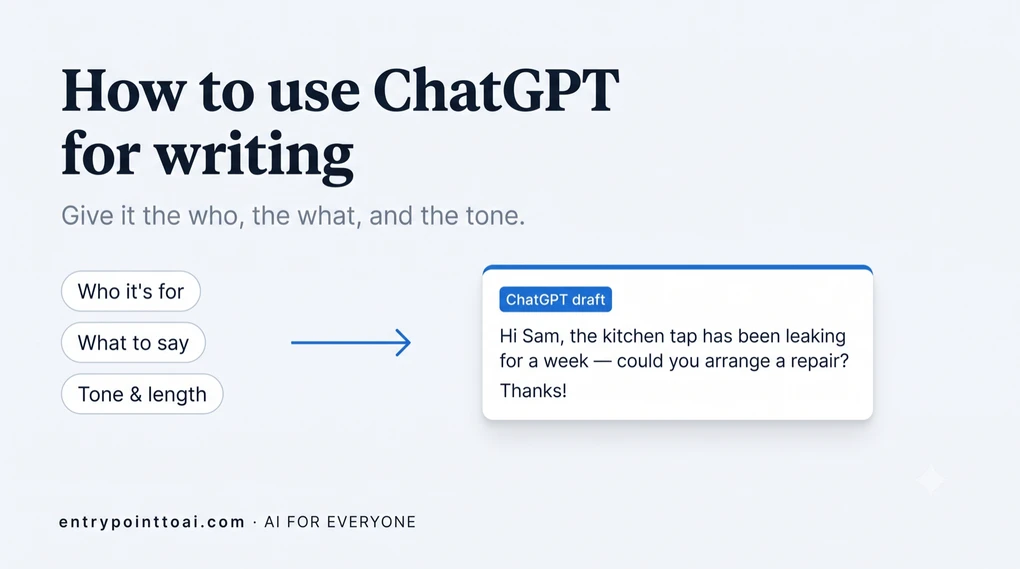
How to use ChatGPT for writing: emails, letters, and more
The hardest part of writing is usually the blank page. ChatGPT removes it — give it the basics and you get a first draft to shape in seconds. The key is knowing what to tell it.
The quick version:
- Give ChatGPT three things: who it’s for, what you want to say, and the tone.
- You edit the result. It’s a starting draft, not a finished piece.
- Never send anything without reading it first; it can sound confident and still get a detail wrong.
Writing with ChatGPT works best as a loop, not a single command. You ask, it drafts, you nudge it until it’s right, then you read it and send. Here’s the shape of it:
The basic recipe
Good writing help starts with a clear request. Three things make the difference:
- Who it’s for — your boss, a friend, a company, a landlord.
- What you want to say — the actual point or request.
- The tone and length — friendly or formal, short or detailed.
Try this: “Write a short, friendly email to my child’s teacher asking for a quick meeting about homework. Polite and warm, under 120 words.” One sentence, ready-to-edit draft.
If you’re not sure where to start, our guide on what ChatGPT is and how to use it covers the basics. And none of this is ChatGPT-only — the same recipe works in Google Gemini, if that’s what you use (here’s how the two compare).
A vague ask vs. a clear one
The detail you put in is the detail you get back. Watch the difference:
| A vague ask | A clear ask |
|---|---|
| “Write an email about the rent.” | “Write a short, polite email to my landlord: rent will be a few days late this month because of a payroll delay, I’ll pay by the 5th, and apologize briefly.” |
| You get a generic template full of [blanks] to fill in yourself. | You get a finished email that only needs a quick read before you send it. |
You don’t have to get the request perfect. You just have to give it more than a topic. Our prompt builder for writing turns those same three answers into a finished prompt, if you’d rather fill in boxes than compose one.
How do you use ChatGPT to write an email?
Tell it who the email is for, what you need to say, and the tone — that’s the whole trick. Email is where ChatGPT is most useful, because most emails follow patterns it knows well. For more prompts and everyday email scenarios, see our dedicated guide to writing emails with ChatGPT.
- From scratch: “Write a polite email to my bank asking them to reverse a duplicate charge.”
- Replying: paste the email you got and say “Help me reply, keeping it friendly but firm.”
- Fixing tone: paste your own draft and say “Make this warmer,” or “Make this more professional.”

Letters, complaints, and cover letters
For anything more formal — a complaint, a cover letter, a request — give ChatGPT the facts and let it handle structure and tone.
“Write a formal complaint letter to an airline about a 6-hour delay that made me miss a connection. Firm but polite, and ask for compensation.”
You supply the details; it handles the shape. Then you check and adjust.
Messages and the small stuff
Not everything is formal. ChatGPT is just as useful for the little messages that still take effort:
- A warm birthday message that doesn’t sound generic.
- A tactful text to cancel plans without drama.
- A thank-you note that actually sounds sincere.
For short personal messages especially, edit afterward — a few of your own phrases make all the difference.
What if the draft isn’t right? Ask again
Most people give up after one try. The ones who get great results just keep nudging. ChatGPT remembers the draft it wrote, so you can change it in plain words without starting over:
- “Make it shorter” — or “about half the length.”
- “Make it less formal,” or “more formal.”
- “Add a line about the deadline.”
- “Give me three versions so I can pick one.”
Each reply builds on the last. Think of it like talking to a helpful assistant: if the first attempt isn’t quite right, you say what to fix, not “never mind.” Two or three small nudges usually get you there.
How to keep it sounding like you
Out of the box, ChatGPT can sound a bit polished and impersonal. Two fixes work well:
- Show it your style. Paste something you wrote and say “Match this tone.”
- Edit the result. Swap in your own phrases, cut anything that doesn’t sound like you.
- Put standing rules in custom instructions. A preference you have every time belongs in your settings, not in each message. That’s how you get it to stop reaching for the em dash, the habit people most often read as a machine tell.
The goal isn’t to hand over your writing — it’s to get unstuck faster and still sound like yourself. This is the same idea behind using ChatGPT for everyday tasks: a first pass you refine, not a final answer.
Two rules before you hit send
Read everything. Never send ChatGPT’s text unread. It can sound confident and still get a detail wrong — a name, a date, a number.
Don’t share sensitive data. Keep passwords, bank details, and private personal information out of your prompts.
Start with one email you’ve been putting off. You’ll have a solid draft in under a minute.
More in the Using ChatGPT series — plain-English guides for everyday use.
Frequently asked questions
Can ChatGPT write emails for me?
Yes. Tell it who the email is to, what you want to say, and the tone — for example, "a short, polite email to my landlord about a leaking tap, mention it has been a week." It produces a solid draft in seconds that you can tweak and send.
How do I make ChatGPT sound like me?
Give it a sample of your own writing and say "match this style," or describe your tone (casual, warm, direct). Then edit the result so it genuinely sounds like you. The draft is a starting point, not the final word.
Is it OK to use ChatGPT for writing?
For everyday writing — emails, messages, letters, first drafts — yes. Treat it as an assistant that gets you past the blank page. Always read and edit what it writes, keep your own voice, and check any facts before sending.
Can ChatGPT write a formal letter?
Yes. Give it the facts — who the letter is to, what happened, what you're asking for — and it handles the structure and formal tone. It works well for complaint letters, cover letters, and requests. Read the result and adjust the details before sending.
What should I avoid when using ChatGPT for writing?
Avoid pasting sensitive personal or financial details, sending its text without reading it, and trusting any facts or names it includes without checking. It can write fluently and still get details wrong.