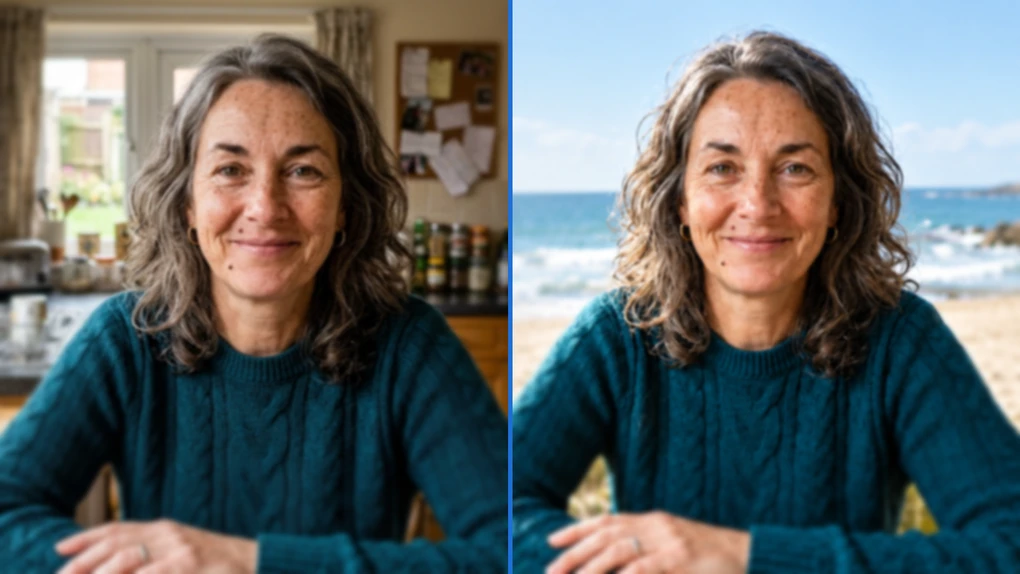
Why does ChatGPT change my face? We tested it
You ask ChatGPT for one small change, a new background, and the person in the photo comes back looking like their own cousin. Same hair color, same smile, not quite the same face. If you’ve wondered why ChatGPT changes your face, the answer is in how it edits. It isn’t built to leave a face alone.
OpenAI says its newest image model, released on September 8, 2026, is “better at preserving the subjects in your reference photos.” We wanted to see what that looks like in practice. So we took one photo, edited it in ChatGPT, and measured the face every time.
The essentials
- When you ask ChatGPT to change a photo you uploaded, it generates a new image instead of retouching yours. Your face gets redrawn along with everything else.
- In our test, the face stayed recognizable. A face-recognition program put every edited version roughly half as far from the original as a different woman made from the same description.
- The small details didn’t hold. After one edit she had darker freckles, deeper lines and curlier hair, and adding “DO NOT CHANGE HER FACE” didn’t help.
Why does ChatGPT change my face?
ChatGPT doesn’t edit your photo in place. It makes a new one.
A regular photo editor works on the tiny dots of color that make up your picture, called pixels. Brighten the sky and it changes the sky’s pixels. The pixels of your face stay exactly as they were.
ChatGPT’s image tool works differently. OpenAI’s own verification page describes what happens when you ask it to change an uploaded file: “the model generated a new file that reflects the changes.” Picture a portrait painter you’ve asked to move you to the beach. They start a fresh canvas and keep glancing back at the old one while they work. Nobody paints the same freckles twice.
OpenAI’s documentation for developers, the people who build apps on top of its models, describes the same limit. A July 2025 guide, now archived and written for an older model, offered a “high input fidelity” setting and said that with it, “faces are preserved far more accurately than in standard mode.” The current guide still lists a known weakness: the model “may occasionally struggle to maintain visual consistency for recurring characters or brand elements across multiple generations.” Neither page is about the ChatGPT app, but both describe what you’re seeing. It’s a cousin of the trade-off behind AI photo tools that invent detail when they sharpen a blurry picture.
There’s also a reason faces are where you notice it, and it has nothing to do with AI. A slightly different cloud goes unnoticed. A slightly different nose on your own face doesn’t.
Didn’t OpenAI just fix this?
OpenAI says it made it better. ChatGPT Images 2.5 came out on September 8, 2026, and OpenAI says it “is better at editing only what you’ve asked for, while keeping the rest of the details the same.” In longer chats, it says, “earlier changes are more likely to stay consistent.” The model began rolling out to every ChatGPT plan that day, free included.
Those are comparisons with the previous model. None of them promises your face comes back untouched, and almost everything written about this problem, from Reddit threads to prompt guides, predates the update. We checked where things stand now.
How did we test it?
We didn’t use a real person’s face. Publishing AI-altered versions of someone who never agreed to it wasn’t something we wanted to do, even with a free-to-use photo. Instead, we had Google’s Gemini create a photo of a fictional woman in her early 50s, with features that are easy to lose: freckles, a small mole on her cheek, laugh lines, graying hair. We made her outside ChatGPT on purpose, so ChatGPT wouldn’t be editing one of its own pictures.
On September 16, 2026, on a free ChatGPT account, we ran two tests:
- One chat, five edits in a row. We uploaded the photo and asked, “Edit this photo: replace the kitchen background with a sunny beach.” Then, one at a time: a red sweater, a straw beach bag, a seagull, a white picnic table.
- A fresh chat with a warning. We uploaded the original again and made the same beach request, adding “DO NOT CHANGE HER FACE. Keep her facial features exactly the same.”
ChatGPT doesn’t tell you which model made an image. Neither does OpenAI’s own checker, which labeled our results only as “gpt-image.” Images 2.5 began rolling out to every plan eight days before our test, and we’re taking OpenAI’s word that it reached us.
Then we measured every face with face_recognition, a free program whose code anyone can inspect. It turns a face into a list of numbers and gives two faces a distance score: 0 means identical, and the bigger the number, the more different the faces. Its authors report 99.38% accuracy on a standard research test.
We hit a snag right away. The program’s default rule says any distance under 0.6 means the same person. We asked Gemini for a second woman from the exact same description, and she scored 0.41 against the first. By that rule, two different people were a match. We dropped the rule and used her as the yardstick instead.
How much did ChatGPT change the face?
It stayed recognizable, but the details didn’t hold.
| Version of the photo | Distance from the original (lower = closer) |
|---|---|
| The original, resized and saved again (no AI) | 0.09 |
| Kitchen swapped for a beach | 0.20 |
| Same request, plus “DO NOT CHANGE HER FACE” | 0.22 |
| After five edits in a row | 0.24 |
| A different woman made from the same description | 0.41 |
Every edited version scored between 0.20 and 0.24. That’s more than double the re-saved file and roughly half the distance to a different woman. In our test, she never came close to passing for a stranger.
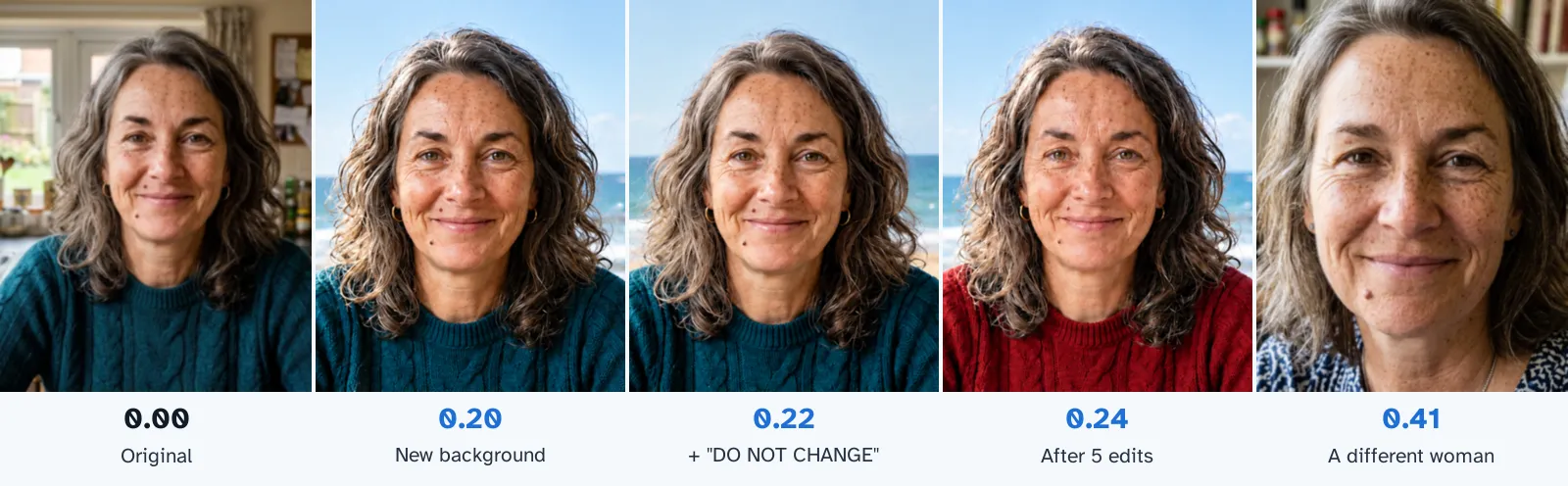
The pictures show what the scores don’t. After the very first edit, the one that only asked for a beach, her freckles were darker and more numerous, the lines around her eyes were deeper, and her hair was curlier and fuller. The mole stayed. She looked like someone who’d spent the whole summer outdoors.
We have a guess about why, and it’s only a guess. OpenAI says the new model “produces more natural lighting and richer textures.” Bright beach sun plus richer texture is a fair recipe for freckles and lines coming forward, but OpenAI hasn’t said anything about faces specifically.
It caught us off guard, because the complaint people usually share runs the other way. In April 2025, on an older model, Zayna Allen at 21Ninety asked only for a slightly darker background and got back skin that was “maybe a bit smoother,” a jawline “slightly more chiseled” and eyes “just a little bigger.” Our fictional woman came back more weathered. One face can’t tell you which direction ChatGPT will push yours. It does show that it pushes.
The measurement has limits too. The program is built to answer one question: do two faces belong to the same person? It isn’t built to count freckles, and changes to skin and hair may barely move its score. Its documentation also warns that accuracy varies between ethnic groups and that it works poorly on children. Read the numbers as “same person or not,” and look at the pictures for the rest.
Does typing “don’t change my face” work?
Not in our test. The beach edit with “DO NOT CHANGE HER FACE” scored 0.22, against 0.20 without it. That’s no improvement, and side by side the two faces look nearly identical, extra freckles and all.
The instruction goes to the same painter. It can ask for care, but the whole picture still gets painted again.
At least one prompt guide calls a background swap “completely face-safe.” In our test, that swap was the biggest single jump: 0.20 from the original, against about 0.10 for each later edit measured from the picture before it. Part of that first number comes from the photo changing size, which scored 0.09 on its own.
The catch: each version ran once. Our free account hit its image limit before we could repeat anything.
Does the face change more with every edit?
A little, in our one run, and not in a straight line. Measured against the original, the first four edits scored 0.20, 0.20, 0.22 and 0.24. The fifth dipped slightly.
OpenAI says edits should hold steady now, since “earlier changes are more likely to stay consistent.” Our whole climb, from 0.20 to 0.24, is smaller than the 0.09 that re-saving the photo produced. One run can’t separate a real trend from normal wobble.
One result did stand out. The last request, a white picnic table that’s mostly out of frame, barely changed anything you can see. Compared with the picture before it, her face still moved 0.12, the biggest of the four later steps. An edit with almost nothing to do still repainted her face.
How do I stop ChatGPT from changing my face?
You can’t lock it, but you can give it fewer chances to drift:
- Start from the original each time. Open a new chat, upload your untouched photo, and make your change there. Every extra edit in the same chat is one more redraw of your face.
- Ask for everything at once. “A beach background and a red sweater” is one redraw. Two separate requests are two.
- Compare the result with the original before you post it. Check the eyes, the nose and any marks like moles or scars. Small changes are hard to spot when you only look at the new version.
- For a new background alone, skip the repainting. A photo editor that cuts you out and places you on another picture moves your own pixels instead of drawing new ones. Make sure your app can do both halves of that job. Apple’s support page says the iPhone’s built-in cut-outs “cannot be pasted onto another photo.”
OpenAI also says Images 2.5 lets you “place comments directly on images for more focused editing.” We don’t know yet whether that protects a face, because our free account ran out before we could try it. For more ways to get what you want from the app, see our guide to using ChatGPT.
Is it safe to upload a photo of my face to ChatGPT?
A photo of your face gets no special treatment. It’s handled like anything else you send ChatGPT, and the same settings apply, including the one that decides whether your chats can help train future models. Our guide to what happens to your data when you use AI tools shows where that switch is.
The picture you get back carries a label, too. OpenAI says images made with its tools, including edits of photos you upload, get C2PA metadata, a kind of digital label, plus an invisible watermark. When we ran our beach edit through OpenAI’s checker, it came back “Generated with OpenAI tools.” A screenshot can strip the label. The watermark is tougher: OpenAI says it’s designed to survive changes like cropping and compression, and it held up when we put those checks to the test. A clean result still doesn’t prove a photo is untouched.
Frequently asked questions
Why does ChatGPT change my face when I only ask for a new background?
Because it doesn't retouch the photo you upload. OpenAI says that when you ask for a change to an uploaded picture, the model generates a new file that reflects the changes, so your face gets drawn again along with everything else. In our test on September 16, 2026, a request to swap a kitchen for a beach, with no mention of the face, came back with darker freckles, deeper lines and curlier hair.
Does typing 'do not change my face' work in ChatGPT?
It didn't in our test, where each version ran once. With 'DO NOT CHANGE HER FACE. Keep her facial features exactly the same.' added, the face scored 0.22 on a face-recognition distance measure, where lower means closer to the original. Without it, the score was 0.20, and the two faces look nearly identical.
Did ChatGPT Images 2.5 fix faces changing?
Not fully. OpenAI says the model, released on September 8, 2026, is better at preserving the subjects in your reference photos and at editing only what you asked for. In our test eight days later, the face stayed recognizable, roughly half as far from the original as a different woman made from the same description, but her freckles, lines and hair still changed on the first edit.
How do I stop ChatGPT from changing my face?
You can't lock the face, but you can give it fewer chances to drift. Start each edit from your untouched original in a new chat, ask for all your changes in one request, and compare the result with the original before you post it. If all you want is a new background, a photo editor that cuts you out and places you on a new picture keeps your own pixels instead of redrawing you.
Can people tell a photo was edited with ChatGPT?
Often, yes. OpenAI says images made with its tools, including edits of photos you upload, carry C2PA metadata, a kind of digital label, plus an invisible watermark, and its free checker looks for both. A screenshot can strip the label, but the watermark is designed to survive changes like cropping and compression. A clean result still doesn't prove a photo is untouched.