How to spot AI-generated content and fake images
You can’t do it by eye anymore. The advice most people carry around — count the fingers, look for warped text, watch for writing that sounds too polished — was written for tools that no longer exist. The better question isn’t “does this look fake?” but “where did this file come from, and can I check?”
The short version:
- Looking harder has stopped working. The old way to spot AI-generated content, counting fingers and hunting for warped text, was written for tools nobody uses now.
- Detectors are worse than their reputation. OpenAI built one, measured it, and pulled it down.
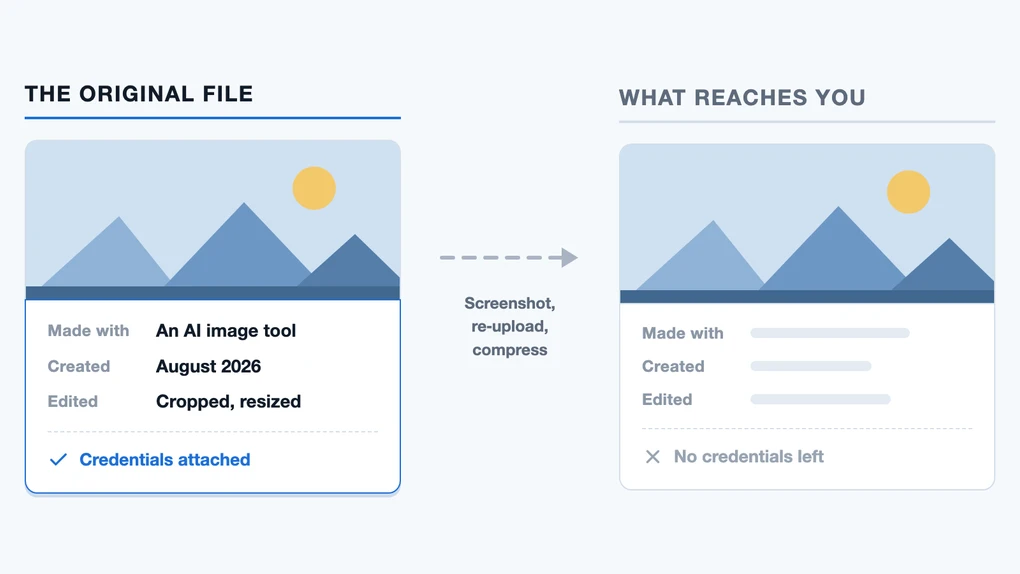
- Provenance is the real test — invisible watermarks and attached credentials. A screenshot destroys the credentials outright, and the watermark that survives can only be read by whichever company put it there.
Can you still spot AI images by looking at them?
Sometimes, by luck. Not reliably, and not in the way the popular checklists describe.
The famous tells came from a specific moment around 2022 and 2023, when image generators were bad at hands, teeth, jewelry, and lettering. Those were real weaknesses and they got engineered away. A generator that still produces six-fingered hands is one almost nobody has a reason to use.
Garbled text is the one old tell with some life left in it. We can vouch for that from our own work: we generate the illustrations for this site, and four batches in a row got thrown out because the lettering came back as nonsense. But notice what that actually proves. It shows the flaw still exists in some tools, on some prompts. It does not mean clean text proves a human made something, and it never told you anything about the images that came out fine.
Google’s own guidance still lists visual artifacts as one method, alongside inconsistent shadows and repeated patterns. It’s a reasonable starting point. It is not a verdict, and treating it as one is how people end up confidently wrong in both directions.
One visual clue is deliberate rather than accidental: some tools stamp their pictures. Gemini puts a small sparkle mark in the corner of the images it makes, but only on some plans. Google says it keeps that mark for free and mid-tier users and drops it for its top-priced subscribers and inside its developer tool. So the sparkle is a label rather than a mistake, and it’s either easy to crop off or was never there to begin with. That’s roughly how much weight it can carry.
Do AI detectors work?
No, and the strongest evidence comes from the company with the most reason to want one.
OpenAI released a tool in January 2023 to detect AI-written text. Six months later it took the tool down, and the note still sits at the top of the original announcement: the classifier was withdrawn on July 20, 2023 “due to its low rate of accuracy.”
The numbers OpenAI published while it was live explain why. Tested on its own set of English texts, the classifier caught 26% of the AI-written material it was shown, and labeled genuinely human writing as AI 9% of the time. It missed roughly three quarters of what it was hunting for, and it flagged about one innocent text in eleven.
That second number is the one that does the damage. A missed detection costs nothing. A false accusation lands on a student who wrote every word themselves and now has to prove it. We’ve made this point before in our guide for students using AI: keep your drafts and your version history, because they’re better protection than any argument about phrasing.
This isn’t ancient history that newer tools have quietly solved. OpenAI’s current guidance for educators puts the question in a heading — do AI detectors work? — and answers “in short, not in our experience.” The same page reports that when OpenAI trained a detector, it labeled human writing including Shakespeare and the Declaration of Independence as AI-generated, and that it hit hardest on students learning English as a second language and anyone whose writing runs formulaic or concise. The blunt line is OpenAI’s own: even if these tools could identify AI content, “which they cannot,” a few small edits get around them.
One trap worth naming, because it’s the first thing people try: don’t paste the text into ChatGPT and ask “did you write this?” OpenAI says the model has no knowledge of what’s AI-generated and that answers to that question are “random and have no basis in fact.” It will give you a confident yes or no anyway.
Detectors are guessing at style, and style is exactly what a person can change and a model can imitate.
How do you actually check whether an image was made by AI?
You check its provenance, the record of where a file came from, instead of its appearance. Two systems do this, they work differently, and each has a specific blind spot.
| SynthID | Content Credentials (C2PA) | |
|---|---|---|
| What it is | An invisible watermark built into the image itself | Signed information attached to the file, like a shipping label |
| Tells you | That AI made or edited this | What tool made it, when, and how it was edited since |
| Survives editing? | Often — it holds up through resizing, recoloring and compression | Frequently not; conversions and re-uploads strip it |
| Who can read it | The company that put it there | Anyone, using a free public checker |
| AI only? | Yes | No — cameras and newsrooms use it too |
In practice you have three places to check, and you may need more than one.
The Gemini app. Upload the image and ask “was this created with Google AI?” Gemini looks for both SynthID and Content Credentials. The same check works on video and audio, not just stills, up to 90 seconds of video or an hour of audio. Google’s help page is blunt about the catch: other companies have started using SynthID, but Gemini “can currently only recognize content created by Google AI tools.” Two practical limits as of August 2026: the Content Credentials half runs on the web and on Android, with iOS still pending, and you get roughly ten image checks a day, with separate allowances for video and audio.
OpenAI Verify checks whether an image or audio file came out of OpenAI’s tools. Same job, pointed the other way, and with the matching blind spot: OpenAI states plainly that it “is not designed to detect content generated by other AI services.”
The Content Credentials checker reads the C2PA label from any company that writes one, which makes it the closest thing to a neutral option. Its homepage notes that credentials are still rolling out, so plenty of files simply have nothing to show.
Read those three limits together and you get the thing no checklist mentions: there is no universal “is this AI?” button. Each company reads its own signal. Checking properly means trying more than one tool and understanding that a blank result is not an answer.
Why does the check usually come back empty?
Because the evidence gets destroyed in transit, and the most common way to destroy it is the most common way to share a picture.
OpenAI lists the reasons a check finds nothing, and the list is the argument. The file might predate provenance signals. It might come from a tool that doesn’t add them. The metadata may have been “stripped during upload, download, editing, conversion, or sharing.” The watermark may have been “degraded by compression, cropping, noise, edits, format conversion.”
Now think about how a suspicious image usually reaches you. Someone screenshotted it from one app, sent it through another, and it was re-encoded twice on the way. A screenshot is a brand-new photograph of some pixels, so the attached credentials are simply gone. They lived in a file you never received.
The invisible watermark is tougher. It’s baked into the pixels themselves, and Google says it usually survives rescaling, recoloring and compression. Google’s own instructions even tell you to crop tight around a screenshot before checking it. The catch is the one from the section above: a watermark you can’t read is no better than one that isn’t there, and each company only reads its own.
So the informative half of provenance, the credentials that say what made this and when and how it changed, is the half that dies first. It dies on exactly the viral image you wanted to check, and what’s left is a signal you may not have the key to.
We tested this on the photo above
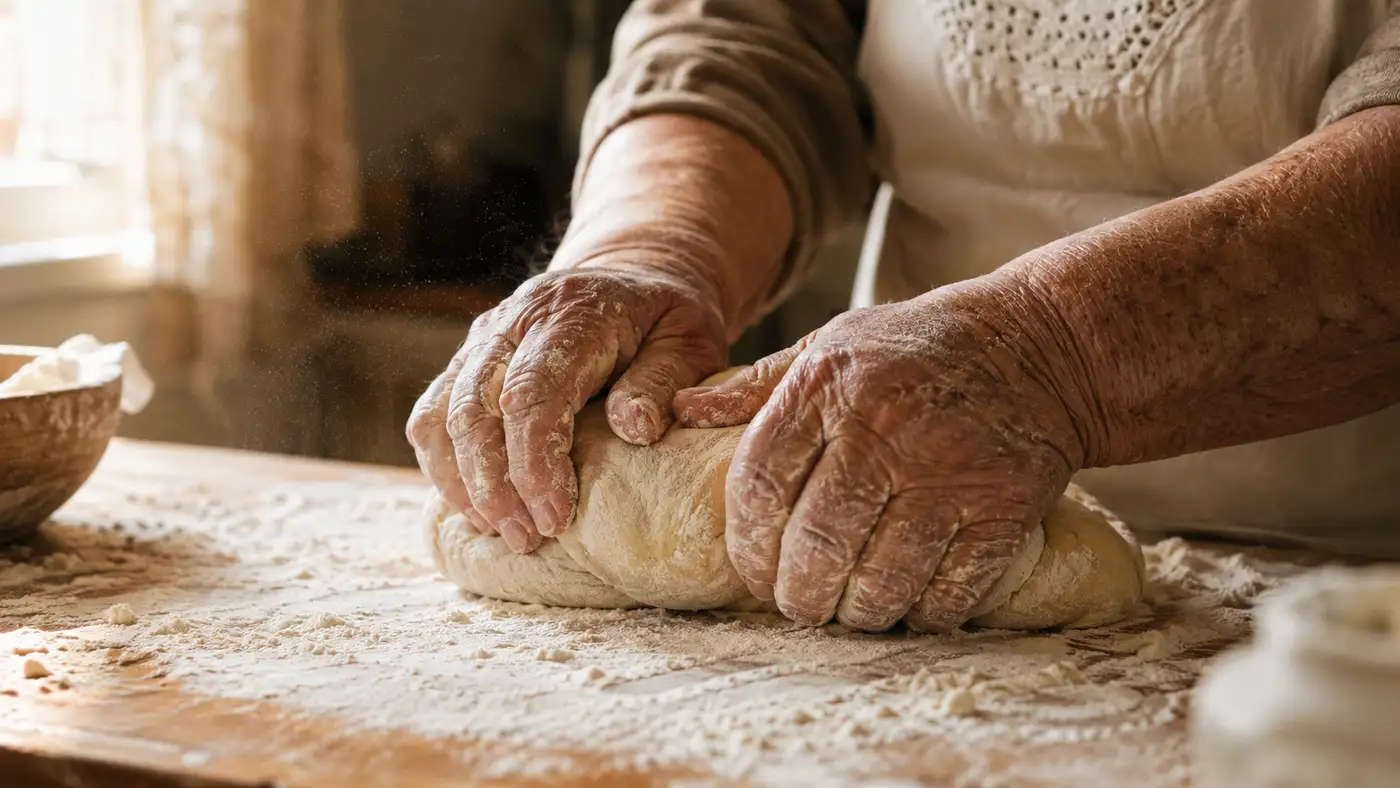
That bread-dough picture gave us a way to measure it. We took the file ChatGPT produced, ran it through OpenAI Verify, then published it here and checked again what your browser actually downloads. Same image, two points in its life.
Straight out of ChatGPT, everything was intact:
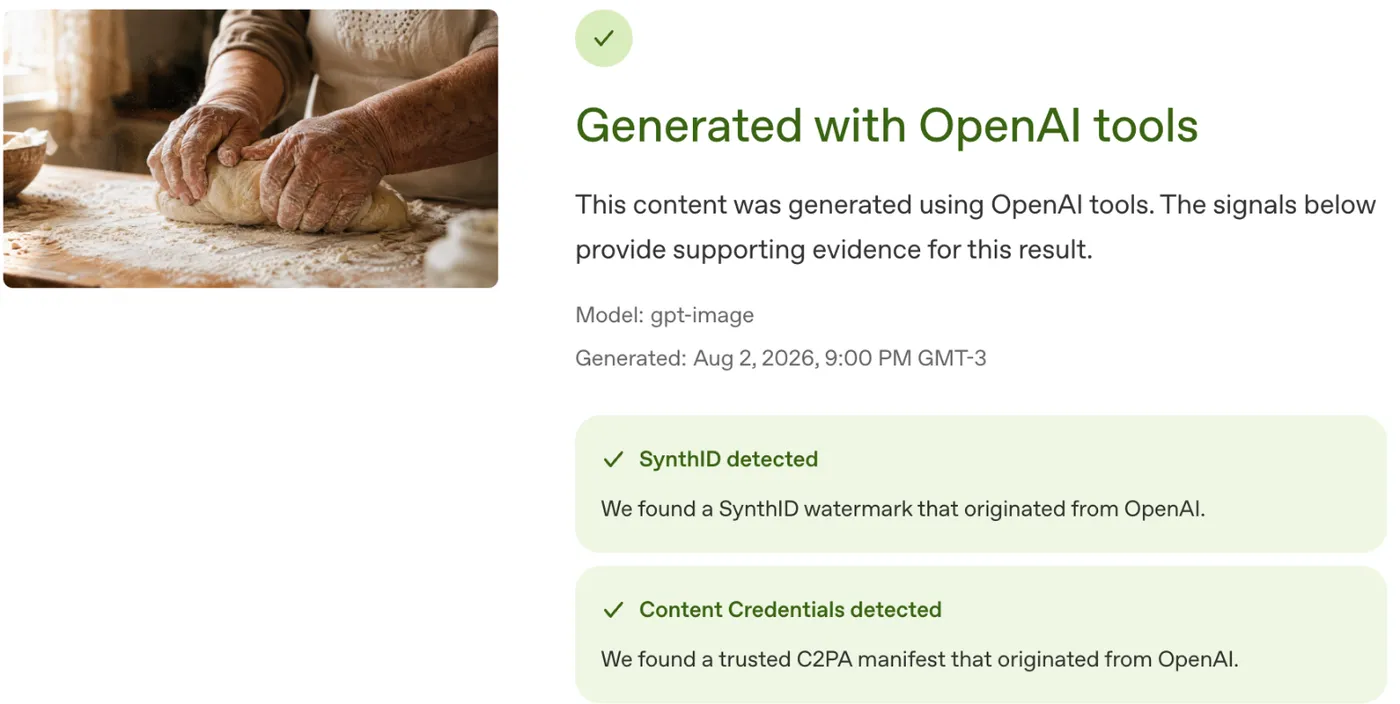
Look at what those credentials carry: the model that made it and when. That’s the useful stuff, the part that would let you tell a reader where a picture came from.
Then we put it on this page. We didn’t strip anything or try to hide its origin. The site just does what every website does: it shrinks the picture a little and converts it to a lighter format so pages load fast. That took it from 2.2 MB to 70 KB. Here’s the same image after that, the exact file this page serves you:
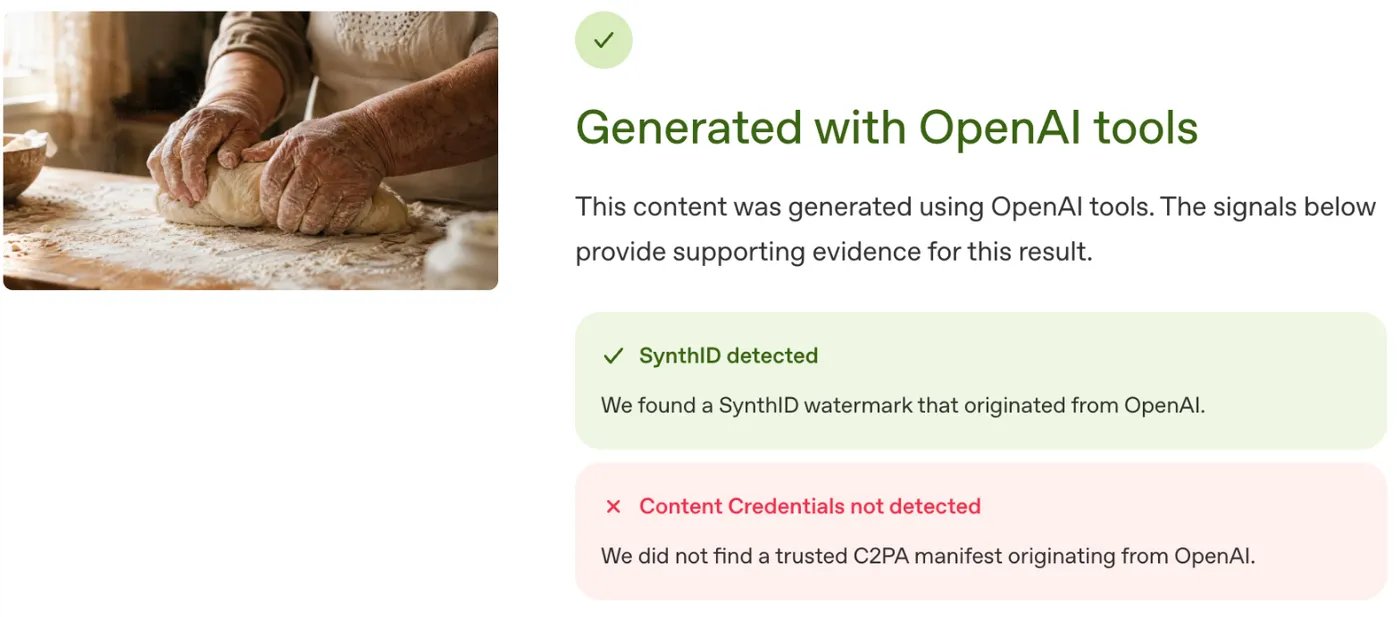
We checked the served file ourselves too, not just through OpenAI’s tool: the credential data isn’t damaged or unreadable, it simply isn’t in the file any more.
The watermark survived a resize, a format change and a 96% reduction in file size. That cuts against the tidy version of this story, so we’ll say it plainly: SynthID is tougher than we expected. Google sets the limit on its own claim, though. After enough rounds of alteration, it says, the watermark can stop being detectable. One trip through a website isn’t enough. Ten might be.
What vanished was the informative half. No model, no date, no edit history. Just a yes. And it’s a yes that only OpenAI can read, on a picture we already knew came from ChatGPT.
Now apply that to a stranger’s photo. You don’t know which company’s tool made it, so you don’t know whose checker to open, and the metadata that would have told you is the first casualty of ordinary sharing. Nobody did anything wrong here. Publishing a picture normally was enough.
Google’s version of this warning is the sentence to remember: if no watermark turns up, it means the content wasn’t made by Google’s AI, but it “could have been created by other AI systems.” No signal found is not the same as no AI involved.
What about video and voice?
Same method, same limits. The provenance checks aren’t just for still pictures.
Gemini will check a video or an audio clip the same way it checks an image, within limits: video up to 90 seconds, audio up to an hour. OpenAI puts its SynthID watermark in the audio it generates too, and its checker accepts audio files alongside images.
The catch is identical, and it bites harder here. A voice clip forwarded through a messaging app has been re-encoded on the way, and a video clipped from a longer one has been re-encoded twice. The same rule applies: no signal found is not the same as no AI involved.
For the fake-voice phone call, which is the version of this most likely to reach you personally, the technical check is beside the point anyway. You won’t be uploading a live call to anything. What works is the boring thing families have always done: hang up and call the person back on the number you already have.
How do you spot AI-written text?
Differently, because there’s nothing to check.
OpenAI attaches provenance signals to the images and audio it generates. Its documentation lists no signal for text, and describes extending coverage to all modalities including text as something it’s still working toward. There’s no watermark in a ChatGPT paragraph. There’s no reliable detector, for the reasons above. There is genuinely no technical test.
What’s left is judging the writing on its substance rather than its style:
- Check the checkable. AI writing goes wrong in a specific way: invented citations, wrong dates, quotes that were never said. Pick one specific claim and look it up. That works regardless of who wrote it.
- Look for what a model can’t have. Firsthand detail, a real number someone measured, an anecdote with names in it. Not proof of a human, but hard to fake convincingly.
- Ignore polish entirely. “Too well written” was never a signal. Plenty of people write cleanly, and models can be told to write sloppily.
- Ignore the punctuation too. The em dash gets treated as a giveaway and it isn’t one. We counted: novels from the 1800s use it about as heavily as the writing people now flag as suspicious.
The honest position is that a competent person editing AI text is undetectable, and pretending otherwise sets you up to accuse the wrong person.
What should you do when you can’t tell?
Ask a different question. “Is this AI?” is often unanswerable. “Should I act on this?” almost always is.
Start with who published it, not what it looks like. A photo from a news organization you can name carries its own accountability. The same image forwarded from an account you’ve never heard of carries none, and that difference holds whether or not AI touched it.
Then notice what the content wants from you. Nearly every harmful fake is trying to make you move fast: send money, click now, be furious before you check. That urgency is the actual warning sign, and it was the warning sign long before AI made the pictures cheaper. Our guide to staying safe with AI tools covers the scam patterns in more detail.
And try a reverse image search. Drop the picture into Google Lens or TinEye and see where else it lives. If someone claims an image has been circulating for days and it has no history at all, that gap is informative. A blank result proves nothing on its own — new and personal photos have no history either — but combined with a story that needs the photo to be old, it’s a strong signal.
We’ve lost the ability to treat a picture as proof on sight. What replaces it isn’t a better eye or a better app. It’s the boring habit of checking where things came from before deciding they’re true.
More on the trade-offs of these tools in the rest of our AI safety section.
About the pictures: the bread-dough photograph was generated with ChatGPT for this article, and no such loaf exists. The two verification screenshots are real, taken from OpenAI’s own tool on the dates described. The diagram at the top was built by hand. In a piece about knowing where images come from, it would be a poor look not to say so.
Frequently asked questions
Do AI detectors actually work?
Not well enough to accuse anyone, and OpenAI still says so in the present tense: asked directly whether AI detectors work, its guidance for educators answers "in short, not in our experience." The company built one and withdrew it on July 20, 2023 because of its low rate of accuracy. In its own evaluation on a set of English texts, that classifier correctly flagged 26% of the AI-written material while wrongly labeling human writing as AI 9% of the time. OpenAI also reports that its detector labeled Shakespeare and the Declaration of Independence as AI-generated.
Can Gemini tell me if any image is AI-generated?
Only partly. You can upload an image, video, or audio clip in the Gemini app and ask whether it was made with AI, and Gemini checks two things: SynthID, Google's invisible watermark, and Content Credentials, an industry standard for recording where a file came from. Google's help page is blunt about the limit — Gemini currently only recognizes SynthID in content created by Google's own AI tools. It can read Content Credentials from other companies, but only when those credentials are still attached to the file.
Does ChatGPT watermark the text it writes?
No. OpenAI adds provenance signals to images and audio it generates, but its help pages list no signal for text, and the company describes covering all modalities including text as a goal it's still working toward. So there is currently no way to check a block of writing the way you can check a picture. Don't ask ChatGPT itself either: OpenAI warns that it has no knowledge of what content is AI-generated, and that answers to questions like "did you write this?" are random and have no basis in fact. Judge the claims in the text instead of the style.
Does an AI watermark survive being saved, resized, or compressed?
Often, yes, and better than you'd expect. We tested it on a photo in this article that we generated with ChatGPT. Straight from ChatGPT, OpenAI's checker found both signals and could name the model and the date. After we published it here, which resized it and converted it to a lighter format, cutting it from 2.2 MB to 70 KB, the SynthID watermark was still detected but the Content Credentials were gone, and the model and date went with them. That's the pattern worth remembering: the invisible watermark is durable, the attached metadata is fragile, and the fragile half is the one carrying the useful detail.
Why does a verification tool say nothing was found?
Because a negative result usually means the evidence is missing, not that the content is real. OpenAI lists the reasons plainly: the file may predate provenance signals, come from an unsupported tool, have had its metadata stripped during upload, download, editing, conversion or sharing, or have had its watermark degraded by compression or cropping. A screenshot reliably destroys the attached credentials, because those lived in a file you never received. An invisible watermark often survives one — Google even suggests cropping tight around a screenshot before checking it — but only the company that added it can read it, and you usually don't know which company that was.