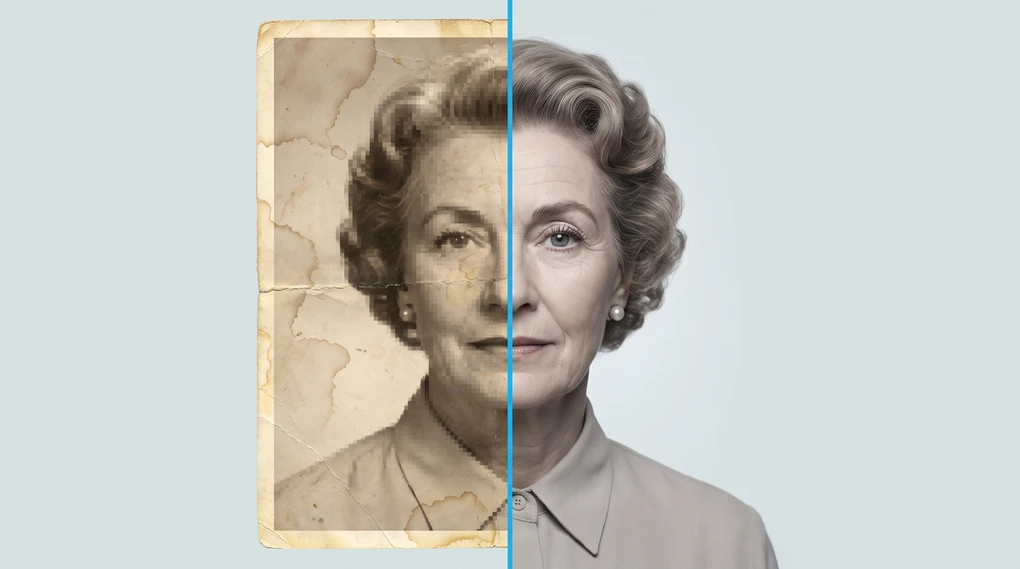
Do AI photo tools really fix your photos?
Somebody scans a shoebox of family photos, runs the blurriest one through an AI enhancer, and gets back a crisp portrait of their grandmother. It’s a small miracle, and it comes with a catch that nobody selling the tool wants to explain: that sharp face was not recovered. It was drawn.
The essentials:
- AI photo tools don’t bring back detail that was lost. They generate new detail that fits the pattern of the photo.
- For backgrounds, clutter, and lighting, that’s a great trade. Nobody can tell whether a patch of sand is the right sand.
- For faces, and for any photo you might lean on as evidence, that’s a real problem.
What does an AI photo tool actually do?
It looks at your photo, works out what’s in it, and then generates pixels that fit. That’s the whole trick, and it’s two different jobs stitched together.
The first job is recognition. The tool identifies where the person ends and the background begins, which parts are sky, which shape is a face. This is computer vision — software trained on huge numbers of labeled images until it can spot the same shapes in a new one.
The second job is generation, and it’s the one people underestimate. Once the tool knows what it’s looking at, it produces new pixels using the same pattern-matching machinery behind most AI: trained on millions of photos, it has learned what skin, brick, grass, and hair tend to look like. Ask it to fill a gap, and it paints in whatever is most plausible given everything around it.
Plausible. Not correct. Everything else here follows from that difference.
Why does removing an object work so well?
Because the tool only has to be convincing, and there’s nothing to be wrong about.
Say you erase a stranger walking through the back of your beach photo. The tool cuts them out and has to fill a person-shaped hole. It has sand below, sea above, and a horizon line to continue. It has seen a staggering number of beaches. So it produces more sand and more sea, matched to the light in your photo, and the seam disappears.
Is that the sand that was actually behind the stranger? Almost certainly not. Does it matter? No — nobody, including you, has any idea what those specific grains looked like. When there’s no correct answer available, a plausible answer is a genuinely good answer.
The same logic explains why background removal, sky replacement, and cleaning up a cluttered room feel like magic. They’re all cases where invention is harmless.
“Enhancing” a photo isn’t the same as restoring it
Product pages blur this distinction, and it’s the one that matters most.
Some edits work with information that’s already in your file. Brightening a dark photo, fixing color balance, straightening a horizon, gentle sharpening — the detail is there, just poorly presented. Photographers have done this in darkrooms and in Photoshop for decades. It’s presentation.
Other edits add information that was never captured. Upscaling a low-resolution photo. Deblurring a shaky shot. Filling in a torn corner. Your camera didn’t record that detail, so no software can find it. The tool makes it up, using its training to guess what was probably there.
| Working with what’s there | Inventing what isn’t | |
|---|---|---|
| Typical edits | Brightness, color, crop, mild sharpening, noise reduction | Upscaling, deblurring, object removal, expanding the frame |
| Where the detail comes from | Your original file | The model’s training on other photos |
| Can it be wrong? | It can look bad, but it can’t invent | Yes — confidently and invisibly |
Both are legitimate. But only one of them can quietly change what your photo shows, and most apps put both behind the same friendly “Enhance” button.
What about old family photos?
This is where the distinction stops being academic.
Run a blurry 1950s portrait through an enhancer and the tool will give you a sharp face. It has to — that’s what you asked for. But it had almost no facial detail to work from, so it built the face out of what faces generally look like. The eyes are now crisp. They may not be your grandmother’s eyes.
You’ll see this in a particular, uncanny way: the restored photo looks like someone who resembles the person you remember. Skin gets smoothed into a texture that no film stock ever produced. Old-fashioned features drift toward modern ones, because that’s what the model was trained on.
None of that means don’t do it. A sharpened portrait on the wall can be lovely, and for damaged photos — creases, water stains, missing corners — AI repair is often excellent, because it’s filling in background rather than reconstructing a person.
Two habits make it safe. Keep the original scan, untouched, in its own folder; the AI version is a new photo, not a replacement. And put them side by side before you accept the result. If the face has changed, you’ll see it immediately in the comparison and never notice it alone.
Is it still a real photo?
Photographers have argued about this for as long as there’s been a darkroom, and the honest answer is that the line moved rather than disappeared.
Most people land somewhere around this: adjusting how a photo looks is editing, and adding things that weren’t in front of the camera is something else. Brightening a dim wedding shot doesn’t change what happened at the wedding. Erasing your ex from it does.
For personal photos, you get to decide, and the stakes are low. It matters more when a photo is doing a job — documenting damage for a claim, showing a product you’re selling, proving something. There, an invented detail isn’t a style choice. It’s a false statement in a file that looks like evidence — the same trap as any AI output you can’t verify.
Some photo apps have started tagging AI-edited images in the file’s hidden data. That’s useful, but it’s not something you can rely on yet, and it doesn’t survive a screenshot.
What free AI photo tools can I try right now?
There’s probably one on your phone already, and you don’t need a new account to start.
Look for the eraser tool inside your photo editor. Google Photos calls its version Magic Eraser, free for everyone on Android and iOS; its bigger sibling, Magic Editor, is free too but limits how many edits you can save each month. Samsung’s Galaxy phones have an object eraser in the gallery app. On iPhone, the Clean Up brush in Photos needs Apple Intelligence, so it only appears on an iPhone 15 Pro or an iPhone 16 and newer.
Paid desktop apps like Photoshop do the same job with more control. You don’t need one to start, and for a first experiment you shouldn’t bother.
The names change every year or two. The button always means the same thing: point at something and make it go away.
Start with the edit that plays to the technology’s strengths. Pick a photo ruined by one distraction in the background and erase it. That’s AI photo editing at its best — invisible and impossible to get wrong.
Then run the harder test. Take a photo where you know exactly what the detail should be — a friend’s face you see every week, a sign you can read — and blur or shrink it before letting the tool “enhance” it. Compare it to the original. Seeing the gap between what the file recorded and what the AI produced teaches you more about these tools than any feature list will.
If you’d rather start with a tool you already have open, ChatGPT can edit a photo too, and it works the same way underneath.
So should you use AI photo tools?
Yes, for most of what you’ll throw at them — erasing the tourist, dropping out a background, rescuing an underexposed shot.
Just remember which button you’re pressing. When you ask one of these tools to sharpen a face you love, it doesn’t go looking for what was there. It draws what should have been.
More on putting AI to work in daily life: AI Everyday, or start with the basics in how does AI actually work.
Frequently asked questions
Do AI photo tools actually recover lost detail?
No. Detail that isn't in the file can't be brought back, because it was never recorded. What these tools do is generate new detail that fits the pattern of the photo — a plausible eye, a plausible brick wall. The result usually looks sharper than the original, but the sharpness is invented, not recovered.
Why does removing an object from a photo work so well?
Because the tool only has to guess at background. When you erase a passing stranger from a beach photo, the AI fills the gap with more sand and more sea — patterns it has seen millions of times and that nobody can check. There's no correct answer being missed, so a plausible answer is a good answer.
Is a photo still real after an AI edit?
It depends on what changed. Cropping and brightening are the same edits photographers have always made. Erasing an object or generating a face is different: the file now shows something that didn't happen in front of the camera. Most people draw the line at whether the edit changes what the photo is evidence of.
Should I use AI to restore old family photos?
Try it, as long as you keep the original scan untouched and treat the AI version as a separate, enhanced copy. The risk is faces: when the original is very blurry, the tool invents facial detail, and the result can look like a stranger who resembles your relative. Compare the two side by side before you accept it.
Are AI photo tools free?
Many of the basics are. Object removal, background removal, and auto-enhance are built into the photo apps on most modern phones, so the fastest way to try one costs nothing and needs no new account.